Effortlessly track your
crypto investments
Elevate your investment management with Talu Crypt: a secure platform, user-friendly interface. The Windows desktop app keeps your data on your PC; the web app is an account synced on our server. Automatically update prices and assets you hold on blockchains and exchanges.
Desktop: Windows, data on your PC. Web: in the browser, including Mac, account synced on our server.
YOUR CRYPTO DASHBOARD
Complete overview of
your investments
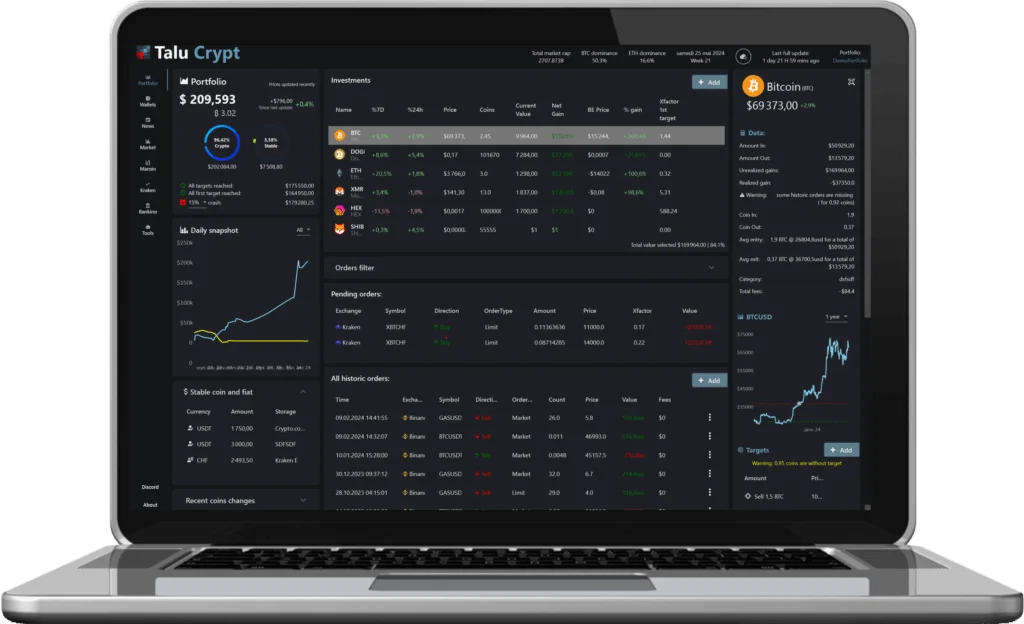
Talu Crypt will be your single place to track your investments, pending orders, historic orders, asset allocation, past performances, cash exposure, price targets etc…
No need to use spreadsheets anymore and manually update it, Talu Crypt does everything for you automatically.
Talu Crypt is not a wallet — it is a portfolio manager allowing you to track your different wallets and assets stored on exchanges in READ ONLY
PRIVACY FIRST
Full overview of all your wallets
Keep an eye on your addresses
Talu Crypt is a non-custodial crypto portfolio manager. On the Windows desktop app, your data stays on your PC.
There is no need to trust any third party. Cut out the middleman!
Warning
Most portfolio management tools store your data on their servers, leaving you unaware of how it's being used. There's a risk of hacking, unauthorized use or sale of your information. In worst cases, sensitive data could be accessed and misused by authorities like tax offices.
Instead, empower yourself with a genuine portfolio management tool. On the Windows desktop app, your data stays on your PC.
WHERE YOUR DATA LIVES
Two versions, two answers
Talu Crypt comes in two versions, and they do not keep your portfolio in the same place. Only one of them keeps everything on your machine, so here is the difference, stated plainly and without small print.
Desktop Windows: 100% local
Your portfolios, your public addresses, the assets you enter by hand and your exchange API keys are written to your PC and never reach our server. There is no account to create and nothing to sync — which also means backing that data up is on you.
One exception: when you ask the AI agent to review a portfolio, that portfolio passes through our server to OpenAI to produce the answer.
Web app: an account synced on our server
So that your portfolio follows you from any device and any browser, the web version stores on our server, hosted in France:
- your email address and your password, kept only as a salted hash;
- your portfolios and their assets, your public addresses and xpub keys, your targets and the order history the app imports;
- the exchange API keys you add, so the server can read your balances and orders — use read-only keys.
Neither version ever holds your coins, and neither one ever asks for a private key or a seed phrase. See exactly what is stored, why and for how long →
BUILD YOUR PORTFOLIO
Various methods for tracking your assets
You can monitor your portfolio automatically by including your exchange API, public addresses, or manually inputting your coin balances.
1. Add your public keys
Enter your public keys, and Talu Crypt will automatically retrieve their assets.
Supported: BTC, ETH, BSC, Arbitrum, Polygon, LTC, NEO, QTUM, XLM, BCH, PLS and 1000+ tokens.
2. Add your API key
Enter your exchange API keys in read-only and Talu Crypt will automatically retrieve assets, orders and history.
3. Add assets manually
Your coin or exchange is not supported? You can add assets with the amount of coins manually.
4. Synchronize all your crypto assets in one click
When you click the sync button, the app will fetch your assets from blockchains and exchanges automatically.
- Auto update of asset prices
- Auto update of balances
- Auto update of trade history
- Auto update of Uniswap transactions
FEATURES
Explore numerous helpful functionalities
Talu Crypt offers a wide range of features that are continuously enhanced. Join our Discord to participate in the development process.
Multiple portfolios
Create separate portfolios for different purposes: conservative, aggressive, or any type you desire.
Ask an AI agent
Ask an AI agent powered by ChatGPT to review your portfolio and provide useful information about risk and strengths.
Calculate trading grids
A tool to help you build your trading grids to scale your market entries and exits.
News aggregator
Stay updated with real-time crypto news gathering updates from top sources in the crypto world.
GET STARTED
Desktop Windows or web app
Two ways to use Talu Crypt. Desktop is Windows only. The web app runs in the browser, including on Mac.
ROADMAP
Our journey so far
- May 1, 2022 — Initial release of Talu Crypt: The first public version of the app.
- October 18, 2022 — Version 1.0.24.0: Asset's chart, news tab, market tab.
- December 23, 2022 — Version 1.1.0.0: Support of multiple portfolios.
- January 27, 2023 — Version 1.1.1.0: Talu Crypt supports now Hex stakes.
- January 12, 2024 — Version 1.1.22.0: Support of Uniswap and Pulsechain.
- March 22, 2024 — Version 1.1.38.0: Tools tab for grid trading simulation.
- May 2, 2024 — Version 1.1.42.0: Support of Mexc Exchange.
- January 12, 2025 — Version 1.1.60.0: AI Agent, margin trading on Bitfinex.
- February 11, 2025 — Version 1.1.68.0: BTC and ETH transactions history.
- June 5, 2026 — Performance & stability update: Faster startup, smoother charts and a long list of bug fixes.
- September 2026 — Talu Crypt on the web: The web app at app.talucrypt.com: your portfolio in the browser, including on Mac.
FAQ
Frequently Asked Questions
How does syncing work with Exchanges?
All exchanges are integrated by creating API keys on the exchange account and specifying them into Talu Crypt. For your security, using API keys with only View permissions is highly recommended.
How does syncing work with assets stored on the blockchain?
TaluCrypt requires you to specify all your public addresses that you want to track. You will never have to enter any private key. Some blockchains support xpub address format.
What if my exchange or blockchain is not supported?
No problem — you can manually add it into the app. Their price and value will be updated accordingly.
Are there any security concerns with my cryptos?
There are no security concerns at all since the app only requires public keys and read-only exchange API keys. On the Windows desktop app, that data stays on your PC.
How much does Talu Crypt cost?
Talu Crypt is free. All features are unlocked for everyone, with no time limit, no subscription and no in-app purchase.
Where is my portfolio stored: on my PC or on your server?
It depends on the version. The Windows desktop app keeps everything on your PC — portfolios, public addresses and exchange API keys never reach our server, the one exception being a portfolio you send to the AI agent for review. The web app is an account: your email, a salted hash of your password, your portfolios, your addresses and your read-only API keys are stored on our server, hosted in France, so that your portfolio follows you from any device. If you want your data to never leave your computer, use the desktop app.
THE TEAM
The team
Talu Crypt is a personal project, developed by a single person in their spare time.
Talu
Creator and principal developer
A software engineer skilled in Microsoft technologies with 15 years of experience developing a variety of applications.